

TV Mountology- TV Mounting in Phoenix and Scottsdale, AZ
Professionals & Services
Phoenix / AL / US
 5 (1)
5 (1)
2 followers
7 Common TV Mounting Mistakes Homeowners Make (And How to Avoid Them)
Mounting a television may seem like a straightforward weekend project, but small mistakes can lead to damaged walls, expensive repairs, or even a fallen TV. Every year, professional installers are called to fix DIY installations that could have been avoided with proper planning.
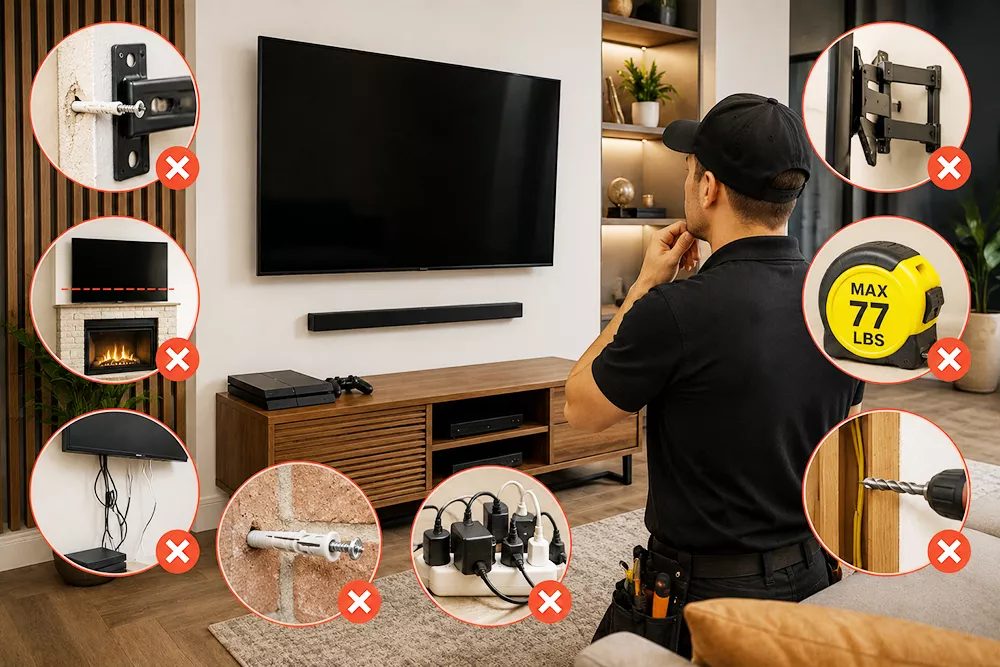
Here are the seven most common TV mounting mistakes—and how to prevent them.
1. Mounting Into Drywall Only
Drywall alone cannot safely support a television.
Even if special anchors seem secure initially, they can eventually loosen under the weight of the TV.
The mount should always be properly secured to wall studs or installed using an appropriate mounting solution for masonry walls.
2. Choosing the Wrong Height
One of the biggest installation mistakes is placing the TV too high.
The ideal viewing position keeps the center of the screen close to eye level while seated.
A TV mounted above a fireplace may require a tilting mount to improve viewing comfort.
3. Using the Wrong Mount
Not every television needs the same type of wall mount.
Common options include:
Fixed mounts
Tilting mounts
Full-motion mounts
Corner mounts
Selecting the wrong style often limits viewing angles or makes accessing cables difficult later.
4. Forgetting Future Connections
Many people mount the TV first and think about accessories later.
Consider whether you'll be adding:
Soundbars
Streaming devices
Gaming consoles
Security cameras
Smart home hubs
Planning ahead reduces unnecessary rewiring.
5. Poor Cable Management
Visible cables can make even an expensive installation look unfinished.
Professional cable management helps create a cleaner appearance while protecting cables from accidental damage.
6. Ignoring Wall Type
Every wall requires a different installation approach.
Examples include:
Drywall with wood studs
Metal studs
Brick
Concrete
Stone
Fireplace surrounds
Using incorrect hardware can compromise the installation.
7. Not Checking Weight Limits
TV mounts have specific weight ratings.
Large televisions—especially 75-inch, 85-inch, and larger models—require mounts designed to support both the weight and size of the display.
Always verify:
TV weight
VESA mounting pattern
Mount capacity
Wall condition
Why Professional Installation Pays Off
Professional installers bring specialized tools such as stud finders, laser levels, masonry equipment, and cable management systems to ensure the job is done safely and accurately.
They can also identify hidden plumbing, electrical wiring, or structural issues before drilling into the wall.
Final Thoughts
A professionally mounted television not only looks better but also provides greater safety, improved viewing comfort, and long-term reliability.
Whether you're installing a new OLED TV, upgrading a home theater, or mounting multiple displays in a business, careful planning helps avoid costly mistakes and ensures years of worry-free entertainment.
https://tvmountology.com/
Mounting a television may seem like a straightforward weekend project, but small mistakes can lead to damaged walls, expensive repairs, or even a fallen TV. Every year, professional installers are called to fix DIY installations that could have been avoided with proper planning.
Here are the seven most common TV mounting mistakes—and how to prevent them.
1. Mounting Into Drywall Only
Drywall alone cannot safely support a television.
Even if special anchors seem secure initially, they can eventually loosen under the weight of the TV.
The mount should always be properly secured to wall studs or installed using an appropriate mounting solution for masonry walls.
2. Choosing the Wrong Height
One of the biggest installation mistakes is placing the TV too high.
The ideal viewing position keeps the center of the screen close to eye level while seated.
A TV mounted above a fireplace may require a tilting mount to improve viewing comfort.
3. Using the Wrong Mount
Not every television needs the same type of wall mount.
Common options include:
Fixed mounts
Tilting mounts
Full-motion mounts
Corner mounts
Selecting the wrong style often limits viewing angles or makes accessing cables difficult later.
4. Forgetting Future Connections
Many people mount the TV first and think about accessories later.
Consider whether you'll be adding:
Soundbars
Streaming devices
Gaming consoles
Security cameras
Smart home hubs
Planning ahead reduces unnecessary rewiring.
5. Poor Cable Management
Visible cables can make even an expensive installation look unfinished.
Professional cable management helps create a cleaner appearance while protecting cables from accidental damage.
6. Ignoring Wall Type
Every wall requires a different installation approach.
Examples include:
Drywall with wood studs
Metal studs
Brick
Concrete
Stone
Fireplace surrounds
Using incorrect hardware can compromise the installation.
7. Not Checking Weight Limits
TV mounts have specific weight ratings.
Large televisions—especially 75-inch, 85-inch, and larger models—require mounts designed to support both the weight and size of the display.
Always verify:
TV weight
VESA mounting pattern
Mount capacity
Wall condition
Why Professional Installation Pays Off
Professional installers bring specialized tools such as stud finders, laser levels, masonry equipment, and cable management systems to ensure the job is done safely and accurately.
They can also identify hidden plumbing, electrical wiring, or structural issues before drilling into the wall.
Final Thoughts
A professionally mounted television not only looks better but also provides greater safety, improved viewing comfort, and long-term reliability.
Whether you're installing a new OLED TV, upgrading a home theater, or mounting multiple displays in a business, careful planning helps avoid costly mistakes and ensures years of worry-free entertainment.
https://tvmountology.com/
1 Likes
